 Paul L.
Drops and Watch Your Language both teach vocabulary and nothing else, but they ask for different things: Drops wants five minutes of your attention in a game, and Watch Your Language wants none. Pick Drops if you enjoy a short daily session with pictures, and it is the better app for that. Pick Watch Your Language if you want words to appear on your iPhone Lock Screen, Home Screen and Apple Watch face without opening anything. The table uses what each product says on its own site or App Store page, checked in October 2026.
| Drops | Watch Your Language | |
|---|---|---|
| Method | Its site describes activities that “combine spaced-repetition, contextual learning, and visual association”. | Spaced repetition on a word and its translation. No game, no pictures on the word. |
| Session length | The site says you can learn words for conversations “in just five minutes a day”. | No session. Words appear where you already look. |
| Languages | “55+ Languages”, per its site. | 25+ languages. |
| Platforms | iOS and Android, per its site. The App Store compatibility section lists iPhone and iPad, with no Apple Watch app. | iPhone and Apple Watch, with widgets on iPad too. |
| Price | The site says premium means “unlimited learning time” and all game modes, so the free version is time-limited. Its US App Store listing shows Premium purchases at several price points between $9.99 and $99.99. | Free to start with pre-made word packs; a Premium subscription unlocks all packs and adding your own words. |
| Who it suits | Someone who likes a short, visual game each day. | Someone who would rather glance at a watch than open a game. |
Key takeaways
- Verdict: Drops is the better app if you enjoy a short daily visual game (five minutes, pictures, 55+ languages, Android); Watch Your Language needs no session at all.
- Drops lists no Apple Watch app and its free version is time-limited; Watch Your Language has no timer and shows words in widgets and watch complications.
- Use both: play Drops when you have five minutes, and let Watch Your Language carry words from your own list through the rest of the day.
Where Drops does more
Drops is the more finished vocabulary game, and it does several things Watch Your Language does not try to do.
- Pictures and play. Its method is built on visual association, and the exercises are games. Watch Your Language shows a word and its translation, nothing more.
- More languages. Its site advertises 55+, against 28 here.
- Android. Drops runs on iOS and Android; Watch Your Language is iPhone and Apple Watch only.
- A defined daily habit. Five minutes is a clear target. If a small daily game is what keeps you learning, Drops gives you one.
Where Watch Your Language does more
The difference is where the learning happens. Drops, like most apps, lives inside its own icon, and the App Store listing shows no Apple Watch app. Watch Your Language puts the word where you are already looking.
- No time limit to run out. Drops' free version is limited in time; Watch Your Language has no timer, because there is no session.
- Lock Screen, Home Screen and watch face. Words show in widgets on the iPhone and iPad and as Apple Watch complications in inline, rectangular, circular and corner shapes.
- Your own words. With Premium you can type words in, import a CSV, Excel or Google Sheets file, or scan handwritten notes. See importing a vocabulary list from a spreadsheet.
- Spoken on the wrist. The watch app reads each word and its example sentence aloud with text-to-speech.
Which one to pick
Pick Drops if…
- You enjoy short games and will open an app for five minutes a day.
- You want pictures attached to words, or you are learning a language Watch Your Language does not cover.
- You want an Android version.
Pick Watch Your Language if…
- You find a daily session easy to skip but you check your watch constantly.
- You want the words you already own, from a class or a spreadsheet, to keep coming back.
- You want vocabulary spread over the day. Learning a language when you are busy covers that routine.
Using both together
Both are vocabulary tools, so using both is mostly about timing. Play Drops when you have five minutes to spare, and let Watch Your Language handle the rest of the day with words from your own list. Neither teaches grammar or conversation, so a course or tutor still has to do that; Watch Your Language vs Memrise compares the app with one that does. For other vocabulary options, see the best vocabulary apps.
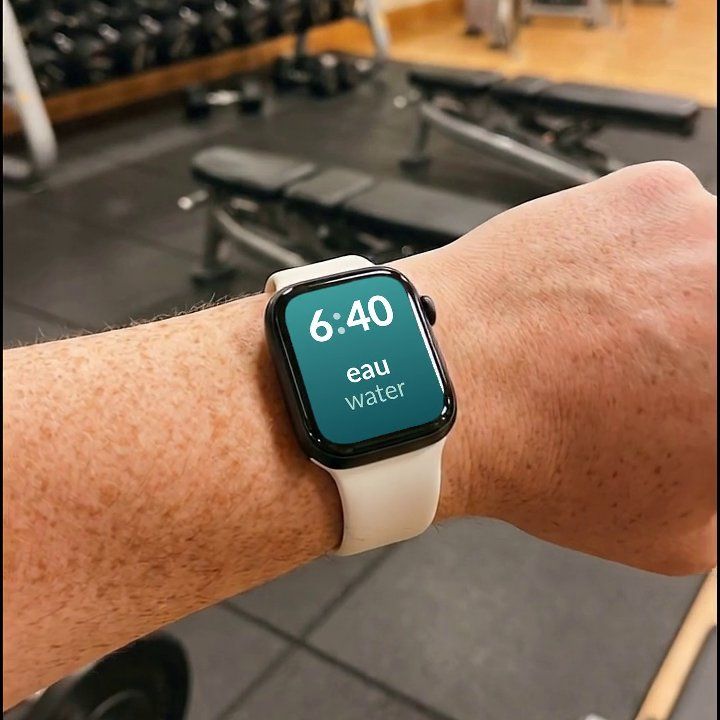
Watch Your Language has no game, no pictures and no daily session, and Drops is the better app if a short visual game is what keeps you going. What the app offers instead is vocabulary that arrives without opening anything: a few words at a time on your iPhone Lock Screen, Home Screen and Apple Watch face, with the ones you keep forgetting shown more often. It is free to start with pre-made packs, and Premium unlocks the rest, including your own words.

