
 Paul L.
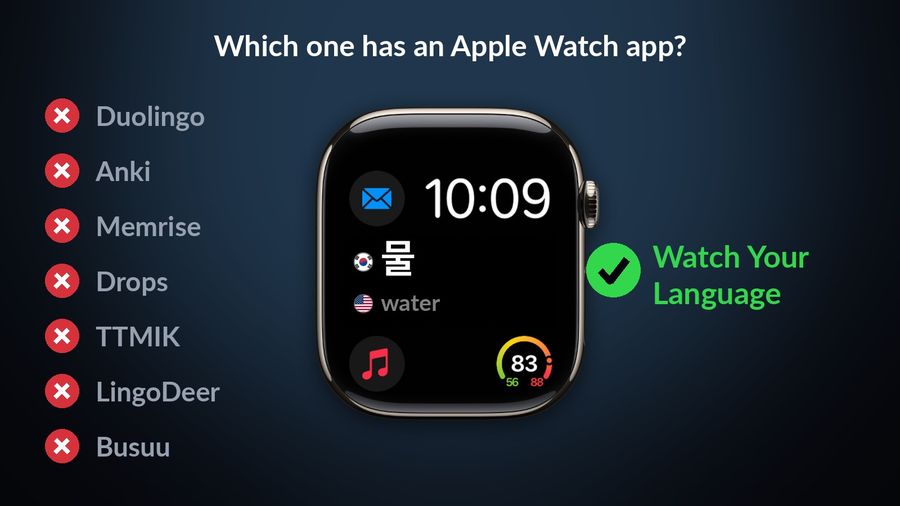
For Hangul taught from the first lesson, look at LingoDeer and Talk To Me In Korean first. Duolingo is a free, gamified on-ramp; Anki hands you full control over a flashcard deck, including ones other learners already built for Korean; Memrise adds native-speaker video and AI conversation practice; Drops turns vocabulary into short, illustrated games; Busuu adds feedback from a community of fluent speakers. Watch Your Language teaches none of that — it keeps vocabulary already met in view on the iPhone and Apple Watch, with no lesson to open.
Key takeaways
- For Hangul from the first lesson, look at LingoDeer or Talk To Me In Korean; Duolingo is the free on-ramp, Anki the deck you control, Drops quick visual games.
- None of the six apps compared lists an Apple Watch app, so words on your wrist need a different tool.
- Watch Your Language shows Korean words with a romanised reading beside the Hangul, but it does not teach Hangul or grammar; use it alongside a course.
How we chose
We compared what each app offers, from its own site and App Store listing, in September 2026: what it teaches, where it runs and how it prices access. This is not a hands-on trial, so every claim links to its source.
Duolingo Korean
Who it is for: a complete beginner who wants a free, gamified way to start without deciding what to study first.
What it does well: short, bite-sized lessons (in the app, each lesson uses energy, which recharges; the web version keeps hearts), and Explain My Answer, free for everyone since 1 January 2026, including in its Korean course, giving a short grammar note on an answer.
What it lacks: an Apple Watch app — its listing shows compatibility with iPhone, iPad and Apple Vision only. Super Duolingo, its paid tier, is listed from $9.99 on the US App Store.
Anki (with shared Korean decks)
Who it is for: learners who want one large, fully personal deck, and who are comfortable either building it themselves or downloading one someone else already built.
What it does well: the desktop app is free on Windows, macOS and Linux, and AnkiDroid on Android is also free, syncing through AnkiWeb; AnkiMobile on iPhone and iPad is a one-time $24.99 purchase on the US App Store, not a subscription. Korean decks other learners have built, TOPIK vocabulary sets among them, are free to browse in AnkiWeb's shared decks and ready to download into the app.
What it lacks: any teaching of its own — Anki is a review schedule, not a course, so choosing a good deck is down to you — and AnkiMobile's compatibility section lists iPhone, iPad, iPod touch and Apple Vision, with no Apple Watch app.
Memrise
Who it is for: learners who want to hear Korean spoken naturally and practise a conversation.
What it does well: real native-speaker video clips and AI-powered conversation practice, with Korean among the languages its listing names.
What it lacks: an Apple Watch app — its App Store compatibility section lists iPhone, iPad, iPod touch and Apple Vision only. Paid plans on that listing start from $24.99 on the US App Store.
Drops
Who it is for: someone who wants quick, icon-based vocabulary drills and does not mind free sessions of five minutes.
What it does well: short vocabulary games built on what Drops' own site calls "spaced-repetition, contextual learning, and visual association", with Korean among the 55+ languages it lists.
What it lacks: free sessions longer than five minutes — Drops' own welcome page says "just 5 minutes a day is enough" and points to a Premium subscription "to practice even more", with in-app purchases starting from $7.99 on the US App Store. Its App Store Compatibility section lists iPhone and iPad only — no Apple Watch.
Talk To Me In Korean (TTMIK)
Who it is for: a learner who wants Korean taught by a company that only teaches Korean, with grammar explained point by point rather than folded into a general-purpose app.
What it does well: its course site describes "1,700+ structured lessons" covering grammar, vocabulary and speaking practice across three levels, and its TTMIK Courses app adds a TOPIK 1 course and uninterrupted listening to its Core Grammar courses. The course site offers one full lesson free, and a 7-day free trial on its Standard Plan.
What it lacks: an Apple Watch app — the TTMIK Courses listing requires iPhone or iPad and does not mention Apple Watch or Apple Vision. In-app purchases on that listing run from $5 a week to $121.99 a year.
LingoDeer
Who it is for: a learner who wants the Korean writing system taught explicitly alongside grammar, in lessons created by language teachers.
What it does well: its App Store listing names Korean among the 20 languages it teaches (English included), starting "from the alphabet", with studio-recorded audio from native speakers and lessons that teach reading and writing an alphabet such as Korean's.
What it lacks: an Apple Watch app — its Compatibility section lists iPhone, iPad, iPod touch and Apple Vision only. The app is free to download, with subscriptions on that listing from $14.99 a month.
Busuu
Who it is for: someone who wants short lessons plus a person, not just software, reacting to a sentence they wrote.
What it does well: Korean is one of the languages its App Store listing names, alongside "feedback from fluent speakers in the Busuu Community" on your own writing and speaking.
What it lacks: an Apple Watch app — its App Store compatibility section lists iPhone, iPad and Apple Vision only. Subscriptions on that listing start from $6.99 a month on the US App Store.
Watch Your Language
Who it is for: someone already using one or more of the apps above, who wants the vocabulary from a lesson to keep coming back afterward, without opening another app to review it.
What it does well: it shows Korean words — pre-made packs or your own — in iPhone Lock Screen and Home Screen widgets, iPad widgets, and Apple Watch complications, each paired with a romanised reading next to the Hangul. Its Basics packs, for example, show 물 with the reading mul ("water"), 친구 with chingu ("friend"), and 커피 with keopi ("coffee"). Spaced repetition decides which word to bring back next, at an interval you choose, from every minute to once a week.
What it lacks: any of the teaching above: it does not explain how Hangul is read, break down a verb ending or correct your pronunciation. It is free to start with pre-made packs; a Premium subscription unlocks the rest, along with unlimited custom words.
How the seven compare
| App | Focus | Platforms | Price |
|---|---|---|---|
| Duolingo | Gamified daily lessons | iPhone, iPad, Apple Vision (no Watch) | Free; Super Duolingo from $9.99 (US App Store) |
| Anki / AnkiMobile | Flashcards; shared Korean decks available | Windows, macOS, Linux, iOS, Android | Desktop/Android free; AnkiMobile $24.99 one-time (US App Store) |
| Memrise | Native-speaker video, AI conversation | iPhone, iPad, Apple Vision (no Watch) | Free to start; paid plans from $24.99 (US App Store) |
| Drops | Icon-based vocabulary games | iPhone, iPad (no Watch) | Free 5-minute sessions; from $7.99 (US App Store) |
| Talk To Me In Korean | Korean-only grammar, vocabulary, speaking | iPhone, iPad (no Watch) | Free trial; from $5/week (US App Store) |
| LingoDeer | Writing system, grammar, listening | iPhone, iPad, Apple Vision (no Watch) | Free to start; from $14.99/mo (US App Store) |
| Busuu | Bite-sized lessons, community feedback | iPhone, iPad, Apple Vision (no Watch) | Free to start; from $6.99/mo (US App Store) |
| Watch Your Language | Passive vocabulary review, no lesson | iPhone, iPad widgets, Apple Watch | Free to start; Premium unlocks all packs |
Which one to pick
- Duolingo if you are just starting and want something free and structured to open every day.
- Anki if you already think in flashcards and want a deck — your own, or one built by another learner — that you fully control.
- Memrise if hearing native speech and practising a conversation matters more than a large personal deck.
- Drops if you want short, visual vocabulary games and a five-minute stop suits you better than an open-ended app.
- Talk To Me In Korean if grammar explained by teachers who only teach Korean is what you are after, TOPIK included.
- LingoDeer if reading Hangul correctly from the first lesson matters as much as vocabulary.
- Busuu if you would rather have a fluent speaker react to a sentence you wrote than rely on an app alone.
Pick Watch Your Language alongside whichever of those you choose — not instead of it — if last week's lesson has already faded by this week. Before choosing, see how Hangul changes the first month of learning Korean and what a word list can't show you about Korean words. You can also browse a free Korean word list by topic or test your current vocabulary level first.
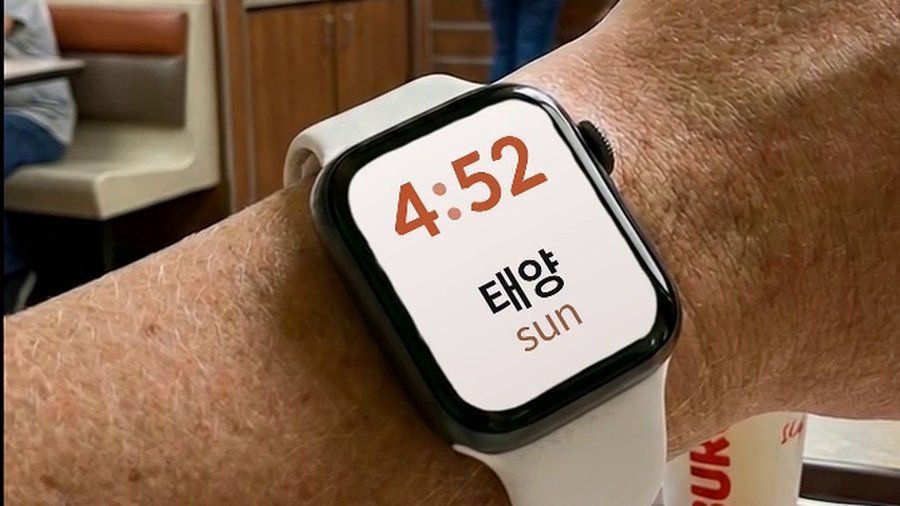

Watch Your Language is not a Hangul course or a grammar app: it shows Korean words, from its pre-made packs or, with Premium, your own list, in widgets on the iPhone and in Apple Watch complications, each paired with a romanised reading, and schedules which word appears next using spaced repetition. It suits a reader who already has a primary study method and wants today's vocabulary to keep surfacing without opening another app — not someone looking for their first structured lesson.