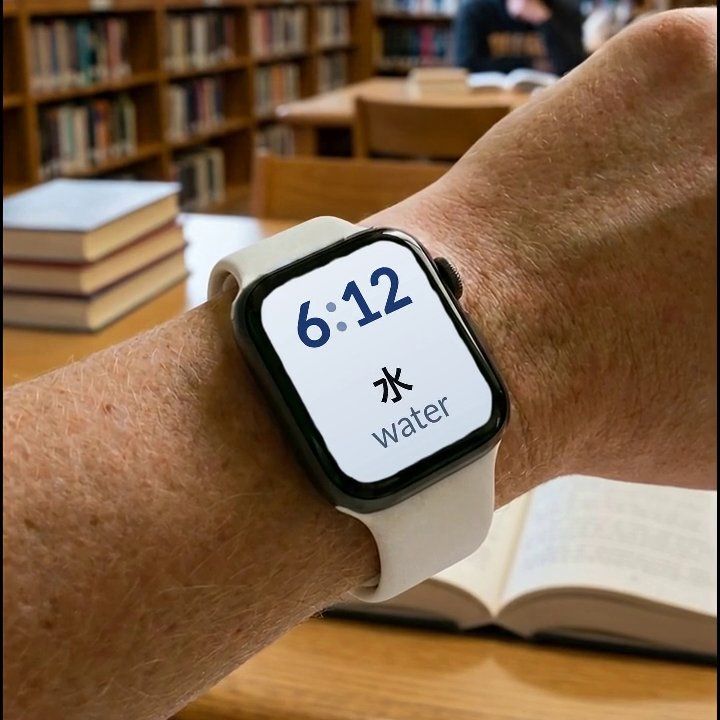
If what you want is new vocabulary appearing on your Apple Watch face through the day, that is a narrow job, and very few apps still do it. If what you want is a language lesson on your wrist, the honest answer in September 2026 is that almost nothing offers one to a new learner: Rosetta Stone's watch companion now belongs to an older version of its app that only existing subscribers can use. Most of the well-known names, including Duolingo, Babbel, Busuu, Memrise and Mondly, have no Apple Watch app at all.
How we compared them
We read each app's own current App Store listing in September 2026 — the "Requires" or "Compatibility" section that states which Apple devices the app runs on — plus the product's own site or help centre where one exists. An app that shipped a watch component years ago but no longer lists watchOS compatibility today counts as not supporting Apple Watch now, because that is what a shopper reading the App Store page actually sees. Every claim below links to the page it came from.

Watch Your Language — vocabulary in a complication, nothing to open
Who it is for: someone who wants a word to be there when they check the time, rather than a task they have to remember to start.
What it does well: vocabulary shows in widgets on the iPhone Lock Screen, Home Screen and iPad, and in Apple Watch complications — inline, rectangular, circular and corner — across 25+ learning languages. A spaced repetition schedule decides which word appears next from the ones you keep forgetting, and you choose how often it changes, from every minute to once a week. There is also a watch app for direct practice: reveal a word, mark it right or wrong. Words come in themed packs graded from A1 to C2, more than 10,000 in total, and you can add your own — typed in, imported from a CSV, Excel or Google Sheets file, or scanned from handwritten notes with the camera. Non-Latin scripts, such as Japanese, Korean and Chinese, come with transliteration.
What it lacks: no lessons, no speaking practice and no grammar explanations — it is a vocabulary tool, not a course. See it on the App Store.
Rosetta Stone — a watch companion, for existing subscribers only
Who it is for: someone who already subscribes to Rosetta Stone Classic and wants short audio lessons on the wrist.
What it does well: the Rosetta Stone Classic (2024) app includes an Apple Watch companion that requires watchOS 9.0 or later. Its support page describes downloading audio lessons directly onto the watch for offline use, covering basic sentences and everyday vocabulary without the phone nearby.
What it lacks: availability. The same App Store listing says the Classic app is only for current Classic subscribers and existing enterprise or education users, and the support page limits the watch companion to personal accounts, so in practice it is open only to existing personal subscribers. New learners are pointed to Rosetta Stone Sapphire, whose listing covers iPhone and iPad with no Apple Watch app. The watch companion also carries audio lessons only, and needs headphones.

Watch Words — a word on the watch face, not updated since 2017
Who it is for: someone who wants a single word and its definition shown on the watch face itself, and has a watch old enough to run it.
What it does well: Watch Words shows a word and its definition on the watch face, refreshed every hour during the hours you choose, with pre-made sets such as business English vocabulary or sets you create yourself.
What it lacks: recent updates. Its listing shows its last version in 2017 and asks for watchOS 2.0, so check that it installs on your watch before relying on it. The listing also does not describe choosing the next word from the ones you keep forgetting, or importing a list from a file.
Where the big names stand today
Duolingo, Busuu, Memrise and Drops all list no watchOS compatibility on their current App Store pages. Pearson's Mondly listing covers iPhone, iPad, Mac and Apple Vision, also without a watch entry. Babbel is the one worth a longer note: it launched a dedicated Apple Watch app in 2015, using location to surface nearby vocabulary categories, but its current App Store listing shows no watchOS compatibility, so that app appears to be gone. AnkiMobile's own knowledge base says the team is not sure Anki's review style fits a device meant to be used a few seconds at a time, so there is no watch app there either.
At a glance
| App | Apple Watch today | What happens on the wrist | Best for |
|---|---|---|---|
| Watch Your Language | Yes | Complications plus a practice app | Passive vocabulary, all day |
| Rosetta Stone | Classic app only, existing subscribers | Downloaded audio lessons | Audio lessons, if you already subscribe |
| Watch Words | Listed (last updated 2017) | A word on the watch face, hourly | A simple word-on-the-watch habit |
| Duolingo | No | — | Daily gamified lessons on the phone |
| Babbel | No (had one in 2015) | — | Structured courses on the phone |
| Busuu | No | — | Courses with native-speaker corrections |
| Memrise | No | — | Vocabulary and phrases on the phone |
| Drops | No | — | Short visual vocabulary games |
| Mondly | No | — | Lessons on the phone |
| AnkiMobile | No | — | Open-ended flashcard decks |
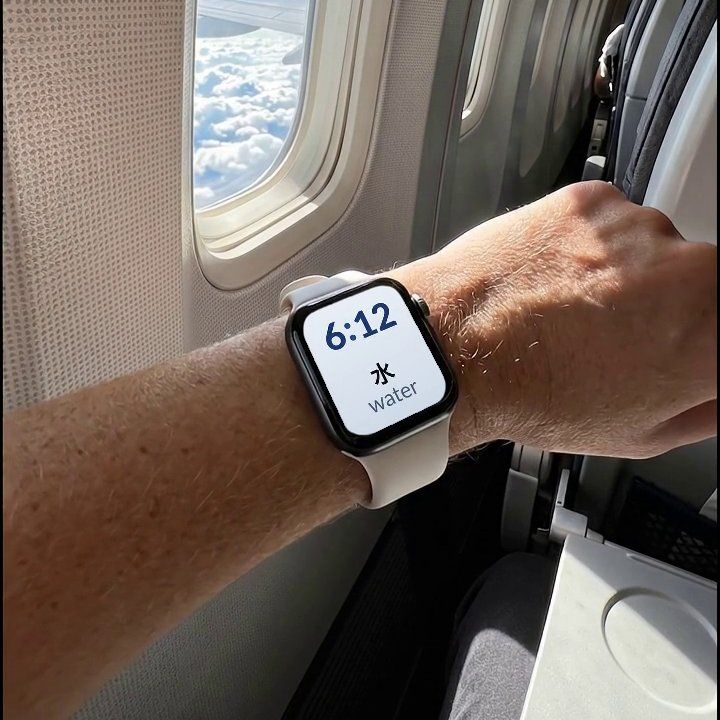

Watch Your Language is the pick here specifically for passive vocabulary on the watch face — a word waiting in a complication every time you check the time, chosen by what you keep forgetting, across 25+ languages. It does not replace a course or a speaking partner, so pair it with whichever of those you are already using, or start with the free pre-made packs and add your own words as you go.
Which one to pick
If the job is words on your wrist without a session to open, Watch Your Language is built for exactly that, and nothing else in this list combines complications, spaced repetition and your own imported words in the same way. If the job is an actual lesson, no app here offers one on the watch to a new learner today: Rosetta Stone's audio companion is limited to existing Classic subscribers, and everything else, including Duolingo, Busuu and Memrise, keeps lessons and speaking practice off the watch. If you are not sure where your own vocabulary currently stands before picking a tool, our vocabulary level test gives you a starting point. And if you want the reasoning behind why brief, repeated exposure works for vocabulary specifically, see How to Learn Vocabulary Without Study Sessions and Spaced Repetition, Explained.