 Eleanora R.
Quizlet is not a bad app; it is a study-set app, built for cramming toward a class or a test, and every reason people leave it traces back to that design. Below are four specific reasons people move on, matched to the app built to fix that one thing — not a general list of "top Quizlet competitors". Everything about the other apps comes from their own site, App Store page or help centre, checked in September 2026.
Key takeaways
- Four reasons to leave Quizlet, four fixes: Anki for visible scheduling, Brainscape for a 1-to-5 confidence grade, RemNote for cards from notes.
- If you built sets and stopped opening them, a better queue will not help; removing the queue will, which is what Watch Your Language does.
- Watch Your Language covers only its own languages and packs, so it does not build a set from any subject, run practice tests or teach grammar.
The scheduling isn't spaced repetition you can see or tune
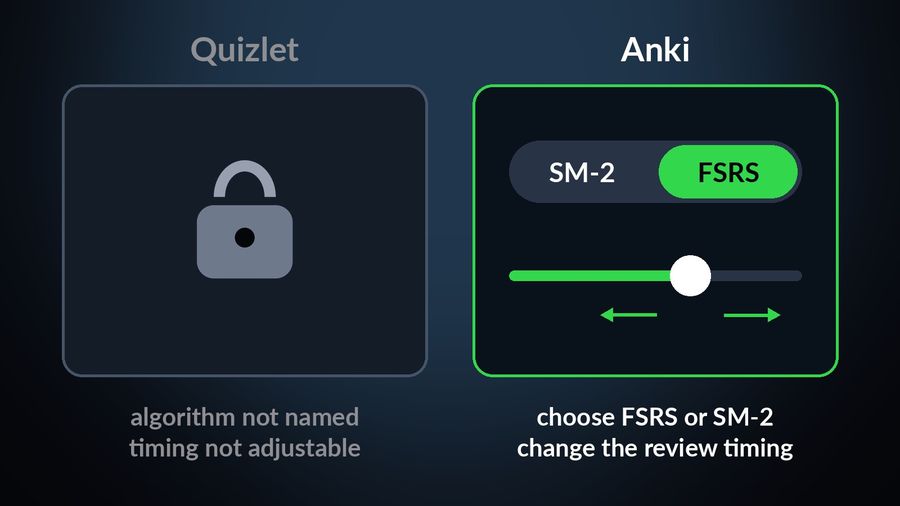
Quizlet's own App Store listing says its spaced repetition "intelligently resurfaces exactly what you need to review, right when you need it", alongside practice tests and a puzzle game, but it does not name the algorithm behind that scheduling or let you adjust it. If you want to see and change the method itself, Anki is built for that. Anki's documentation lets you choose FSRS, "an alternative to Anki's legacy SuperMemo 2 (SM-2) algorithm", and Anki's own site says you can easily change the timing of reviews. The desktop app is free on Windows, macOS and Linux, with AnkiDroid free on Android, and AnkiMobile for iPhone and iPad is a one-time $24.99 purchase on the US App Store, not a subscription. Neither app's compatibility section lists an Apple Watch app. For the fuller comparison of the two, see Anki vs Quizlet.
A right-or-wrong grade feels too blunt
If a plain right-or-wrong answer feels too blunt, Brainscape grades on a scale instead: its Confidence-Based Repetition method asks you to rate your own confidence in a card from 1 to 5, and brings the ones you rated low back sooner. Its free plan allows unlimited flashcard creation and studying unlimited flashcards you made or that are shared with you; Pro is listed at $7.99 a month on a yearly plan on that same page, and its US App Store listing shows Pro purchases of $19.99, $59.99 and $95.99, plus a $199.99 lifetime option — check the App Store in your own country, since these can vary.
Your flashcards should come out of the notes you already take
Quizlet asks you to build or generate a set that lives apart from your notes. RemNote keeps them together: its App Store listing describes note-taking, PDF annotation, flashcards and spaced repetition combined in one app, with "Smart Flashcards" created directly from what you have written, and its own site lists desktop apps alongside iOS and Android. Its pricing page says the free plan covers unlimited notes and flashcards but caps PDF annotation and image-occlusion cards, with Pro starting at $8 a month, $96 billed annually.
You made sets but stopped opening them
The three reasons above are still about finding a better queue. This one is different: the set exists, it just is not part of your day any more, and a better queue does not fix that — removing the queue does. Watch Your Language decides which of your words to show next by spaced repetition, bringing back the ones you keep forgetting, and puts them where you already look — iPhone Lock Screen and Home Screen widgets, iPad widgets, and Apple Watch complications on the watch face — with a Watch app to practise in when you want to. You choose how often a word changes, from every minute to once a week, so there is no session to remember to start.
With Premium, you do not have to retype a set you already built elsewhere: add the words by typing them in, importing a CSV, Excel or Google Sheets file, or scanning handwritten notes with the camera — the steps for a spreadsheet are in importing a vocabulary list from a spreadsheet. Non-Latin scripts such as Japanese, Korean or Chinese show with transliteration alongside the word. It is worth being clear about what this does not replace: it only covers its own catalogue of 25+ languages, in packs graded A1 to C2 with 10,000+ words in total, and it does not build a set from an arbitrary subject the way Quizlet can, nor does it run practice tests or teach grammar.

How the four compare
| App | Best for | Method | Price |
|---|---|---|---|
| Quizlet | A set built quickly for a class or test | Spaced repetition, practice tests, study games | Free to download; in-app purchases from $9.99 (US App Store) |
| Anki / AnkiMobile | A schedule you can see and adjust | SM-2 or FSRS scheduling | Desktop and Android free; AnkiMobile $24.99 one-time (US App Store) |
| Brainscape | Grading yourself on a scale, not right/wrong | Confidence-Based Repetition | Free tier; Pro $7.99/mo on a yearly plan |
| RemNote | Cards that come from your own notes | Notes plus flashcards, spaced repetition | Free plan; Pro from $8/mo billed yearly |
| Watch Your Language | A set you stopped opening | Passive spaced repetition, no session | Free to start; Premium unlocks all packs |
Which one to pick
- Anki if you want to see and adjust the scheduling algorithm, and do not mind a one-time purchase for the iPhone app.
- Brainscape if marking a card simply right or wrong has always felt too crude.
- RemNote if you would rather your flashcards fall out of notes you are already taking than live in a separate app.
- Watch Your Language if the honest answer is that you stopped opening the set altogether, and what you need is for the words to show up on their own.
It is worth saying plainly what none of these do: they are all vocabulary or flashcard tools, not grammar or speaking courses, so if that is what stalled you, look elsewhere for that particular job. You can check your current vocabulary level with the vocabulary level test, or read how the scheduling behind Anki and Watch Your Language actually works in spaced repetition, explained.
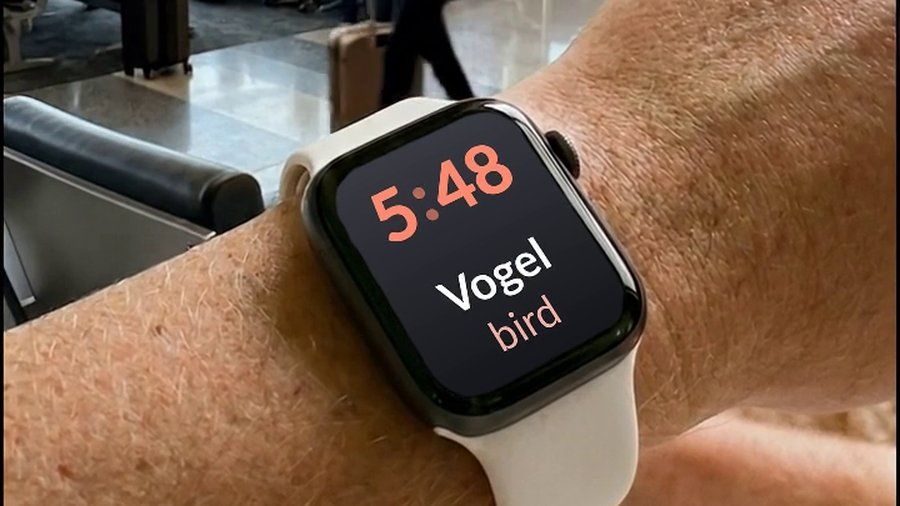

Watch Your Language fits the reason above every other alternative here leaves untouched: a set you built with good intentions and then quietly stopped opening. It is not a general flashcard app — it only covers vocabulary in its own 25+ languages — and it does not run practice tests the way Quizlet can, or teach grammar. What it does is show your words a few at a time on your iPhone Lock Screen, Home Screen and Apple Watch face, deciding what to show next from the ones you keep forgetting, so there is nothing left to remember to open.

